
Turn on Indeed Apply once at the platform level, and every job you publish externally goes out with it — no per-job setup, no extra steps for your recruiters.
Before using the integration, you'll need to create an Employer account on Indeed. Please ensure that you:
- Use your company name exactly as it appears on Indeed.
- Provide an email address associated with your company's Indeed Employer account.
This information is required to successfully enable the integration and ensure proper account alignment.
- You have access to the appropriate integration settings in GR8 People.
- No separate configuration is required for individual jobs.
-
Open the Indeed integration settings
Go to SettingsIntegrationsIndeed
-
Switch Indeed Apply on
For Enable Indeed Apply, select Yes.
-
Save your change
Click Save. That's the whole setup.
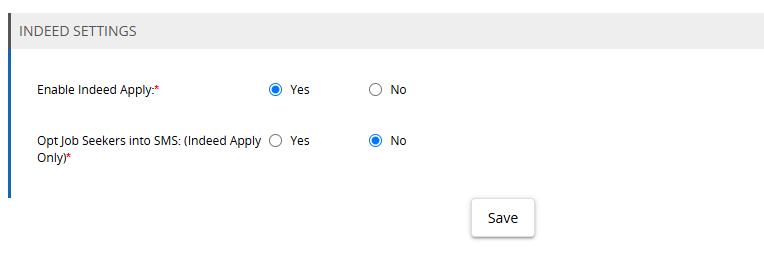
Once Indeed Apply is on, the rest is automatic.
Jobs published externally from GR8 People are automatically included in the Indeed Job feed with Indeed Apply. No additional Indeed configuration is required when publishing individual jobs.
Every externally published job joins the Indeed Job feed with Indeed Apply enabled.
Completed applications are returned to GR8 People and associated with the appropriate job, so recruiters manage those candidates in their normal recruiting workflow.
If Indeed Apply was previously disabled.
Return to SettingsIntegrationsIndeed, select Yes for Enable Indeed Apply, and click Save.
Publishing picks straight back up — there's nothing to reconfigure on jobs that are already live.
Our support team already knows how your platform is configured — no explaining required.